
As online shopping becomes part of daily life, secure and convenient delivery access is essential. Many households use Smart IP Video Intercom systems, but granting delivery personnel entry without compromising privacy is a challenge. DNAKE offers two ways to create delivery codes; this article covers the first—managed by the end user via the Smart Pro App.
With Delivery Passcode Access, residents can generate an eight-digit, single-use code with just one tap. Share the code with a delivery provider, and they can enter the building through the smart home intercom—no more waiting around or missed packages. Each passcode expires immediately after use, and any unused code becomes invalid the next day, so you never have to worry about lingering access.
In this article, we’ll also walk through the building-manager method, which makes it easy to create time-sensitive codes for added flexibility and security.
How to Use the Delivery Key (Step-by-Step)
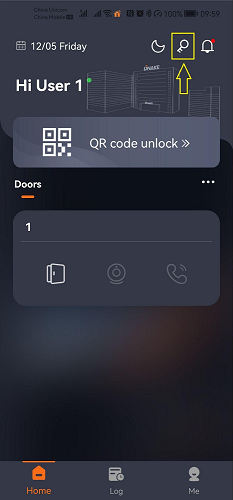
Step 1: Open the Smart Pro App and tap Temporary Key.
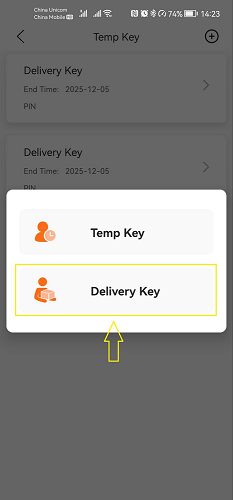
Step 2: Select Delivery Key.
Step 3: The app generates a one-time entry code automatically. Share this code with the delivery person.
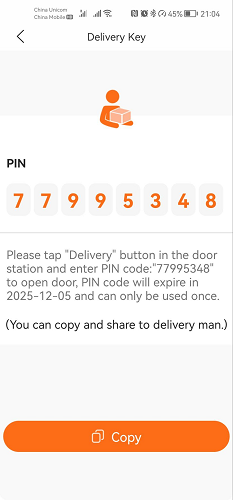
Step 4: At the door station, the delivery person selects the Delivery option.
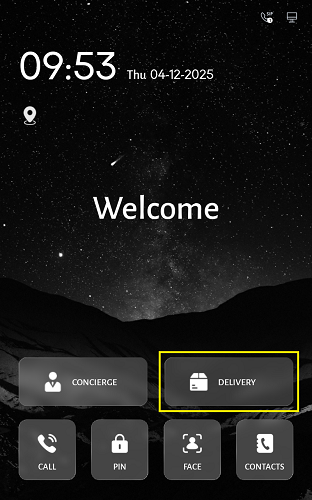
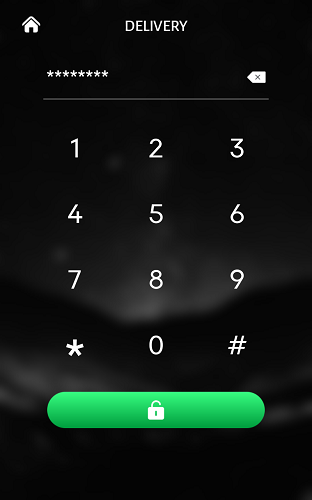
Step 5: Once the code is entered, the door unlocks.
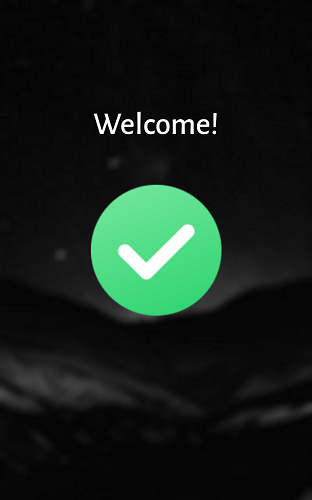
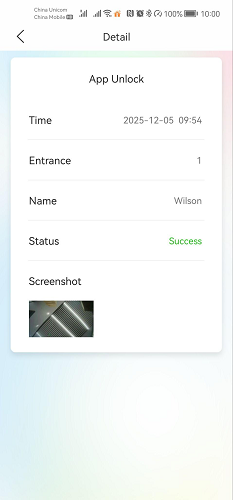
You will immediately receive a mobile notification along with a snapshot of the delivery person, giving you full visibility and peace of mind.
Conclusion
With DNAKE’s Delivery Passcode Access, homeowners can leverage the power of Smart Intercom, IP Video Intercom, Android intercom for home, IP intercom, and SIP intercom technology to make everyday deliveries safer and more efficient. As one of the leading Smart Intercom manufacturers, DNAKE continues to innovate smart access solutions that combine security, convenience, and intelligent design.